
MTD software built for sole traders and landlords
CalCal makes Making Tax Digital feel like using a calendar, not accounting software.
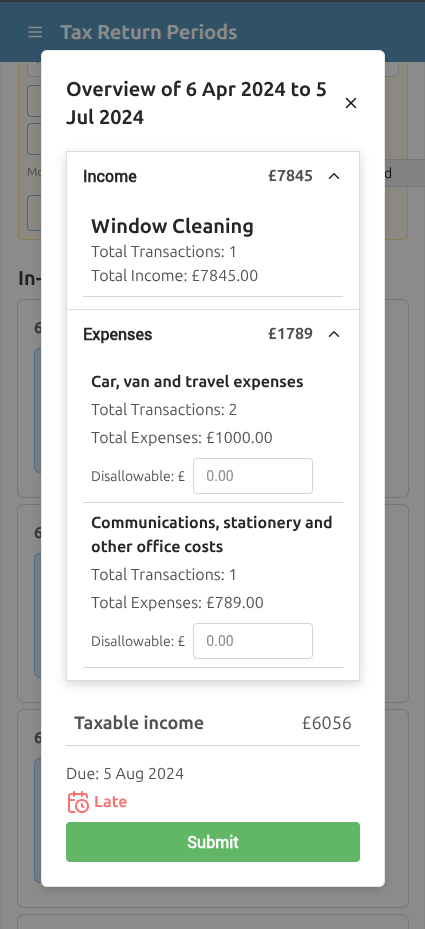
Tap a day, add income or expenses, and review your quarterly update before it goes to HMRC.
- Recognised by HMRC for Making Tax Digital
- Calendar-based records in plain English
- Free 10 days: connect to HMRC and submit an Income Tax MTD update
Mobile app
MTD on your phone
Send quarterly updates from records you already kept on iPhone or Android.


30-second walkthrough
See how calendar-based MTD works
Watch the basic workflow before you sign up: open the calendar, add the day's income or expenses, then review the update CalCal prepares from your records.
Use the controls to play the walkthrough.
Why CalCal instead of traditional accounting software?
You need software you can trust and understand. CalCal keeps the workflow clear, so you can stay MTD-ready without learning accountant language.
Traditional accounting software
- Built around ledgers and accounting screens
- Often assumes you know bookkeeping language
- Can feel heavy if you only need simple records
- MTD is another task to learn
CalCal
- Built around a simple calendar view
- Plain-English income, expense and tax prompts
- Designed for sole traders and landlords doing their own records
- Quarterly updates prepared from what you already entered
Check the fit before you start
CalCal is intentionally simple. That is the point.
Good fit: sole traders
Record sales and costs as you go, then review the MTD update when the quarter is due.
Sole trader guideGood fit: landlords
Keep rental income and property costs organised without building a spreadsheet system.
Landlord guideGood fit: side businesses
Use a calmer tool when your records are straightforward and you want to stay compliant.
Simple softwareNot ideal: limited companies
CalCal MTD Income Tax is focused on sole traders and landlords, not company accounts.
Not ideal: complex bookkeeping
If you need stock control, payroll, departments or accountant-led workflows, a heavier package may fit better.
Best reason to choose it
You can understand what is happening without learning accounting first.
Try CalCalThe quarterly routine in CalCal
A simple rhythm beats a last-minute scramble.
Stop fighting the admin
The point is not more accounting features. The point is relief.
Plain-English MTD guides
Need the detail? These guides answer the common questions without turning the page into a wall of text.
MTD for landlords
Rental income, property costs and quarterly updates.
Landlord guideMTD for sole traders
A calmer route for small businesses doing their own records.
Sole trader guideQuarterly updates
What goes to HMRC each quarter and what waits until year end.
Quarterly guideMTD Income Tax, answered simply
Short answers for people comparing HMRC-recognised software.
Is CalCal recognised by HMRC for MTD?
Yes. CalCal is recognised by HMRC for Making Tax Digital and is built to send the required updates through HMRC's digital routes.
Who is this page for?
Sole traders, landlords and straightforward side businesses that want a simple way to keep records and prepare quarterly updates.
Do I need accounting knowledge?
No. CalCal is built around dates, income and expenses, with plain-English prompts instead of ledger language.
What happens after the free period?
During the 10-day Free trial you can connect to HMRC and submit an MTD Income Tax update if you’re due. VAT is not included on Free. After day 10 your account is read-only — upgrade to Unlimited to keep filing.
Get MTD-ready without wrestling the forms
Try the calendar-based way to keep MTD records.
Try free for 10 days — connect to HMRC and send an MTD Income Tax update if you’re due. After that, upgrade to Unlimited to keep filing.
Recognised by HMRC for Making Tax Digital
Built for sole traders and landlords who want straightforward records, quarterly updates and plain-English guidance.
No credit card required for the free period.